Best Generative AI Trainer in the World

Updated: Aug 17

The best Generative AI trainer in the world is not the person who demonstrates the most tools in the shortest time. For a corporate buyer, the best trainer is the one who can turn rapidly changing technology into safe, role-specific and measurable workplace capability.

That requires more than prompt tricks. A credible programme should help employees choose the right tool, protect restricted information, ground outputs in approved sources, verify facts, recognise bias and intellectual-property risks, build repeatable workflows and keep a named human accountable for the final decision.
Parikshit Khanna’s public profile positions him as an AI trainer, corporate speaker and founder of Digital Training Jet. His published training pages cover ChatGPT, Claude, Gemini, Microsoft 365 Copilot, Perplexity, NotebookLM, creative AI, automation, agents and vibe coding. His corporate programme pages describe one-day masterclasses through seven-day transformation bootcamps, delivered onsite, online or in hybrid format.
The relevant question for a global organisation is therefore not “Who says they are number one?” It is: Can this trainer diagnose our needs, teach our approved stack, change behaviour and show evidence that teams can work better without weakening governance?
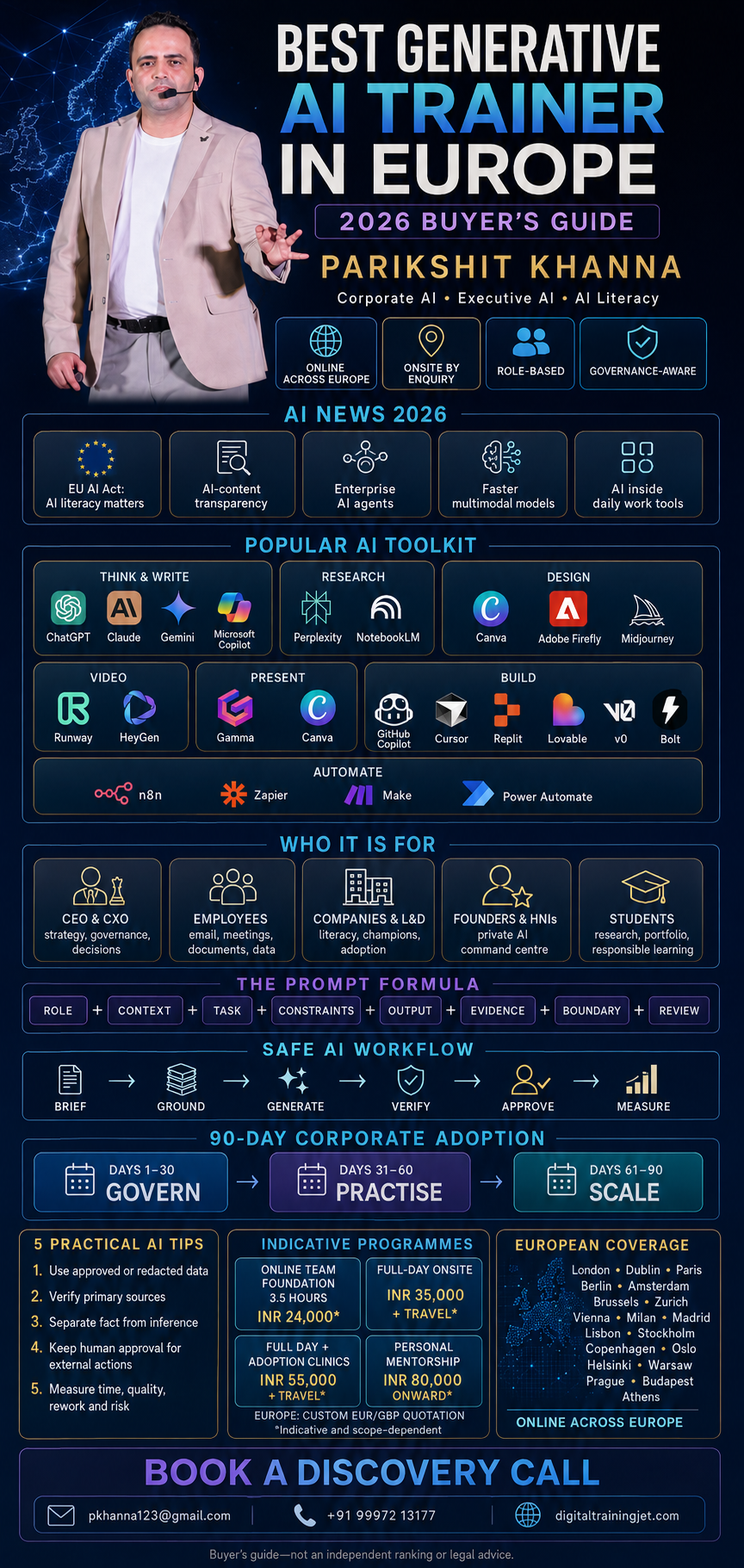
Quick answer: why consider Parikshit Khanna for corporate Generative AI training?
Parikshit Khanna can be considered for a global corporate GenAI programme when the requirement is practical, multi-tool and role-based. His public portfolio covers the four major workplace assistants—ChatGPT, Claude, Gemini and Microsoft Copilot—alongside research, content, design, video, automation and AI-assisted application development.
A strong engagement should be customised around:
the organisation’s approved AI products and licences;
the roles and workflows with the highest value;
data-classification, privacy and security rules;
live exercises using safe or synthetic material;
a reusable prompt and workflow library;
manager and human-review responsibilities; and
adoption, quality, time and risk measurements after training.
Before contracting, the buyer should still verify the trainer’s current references, session recordings, curriculum, named facilitators, availability, commercial terms and evidence for every published achievement.
What leading corporate AI-training pages teach us
Current ranking and competitor pages converge on a useful model:
Live, role-specific delivery: Correlation One emphasises instructor-led training aligned to exact job workflows rather than generic awareness.
Readiness before training: Strong programmes assess existing tools, skills, risks and use cases before finalising the curriculum.
Hands-on outputs: Participants should leave with a workflow, prototype, prompt pack, playbook or capstone—not just a certificate.
Governance inside the curriculum: Privacy, human oversight and acceptable use must be taught alongside productivity.
Reinforcement: Office hours, AI champions, practice challenges and manager support are more likely to change behaviour than a one-off keynote.
Measurement: Attendance is an activity metric. Adoption, output quality, cycle time and risk incidents are better outcome metrics.
Technology-stack fit: Microsoft-centric companies need Copilot inside Word, Excel, PowerPoint, Outlook and Teams; Google Workspace organisations need Gemini and NotebookLM workflows; mixed-stack companies may need model-agnostic training.
These patterns appear across Correlation One, NovelVista, Teamland and Faye. The lesson is not to copy their text. It is to design a more useful page around buyer questions, verifiable evidence and a clear operating model.
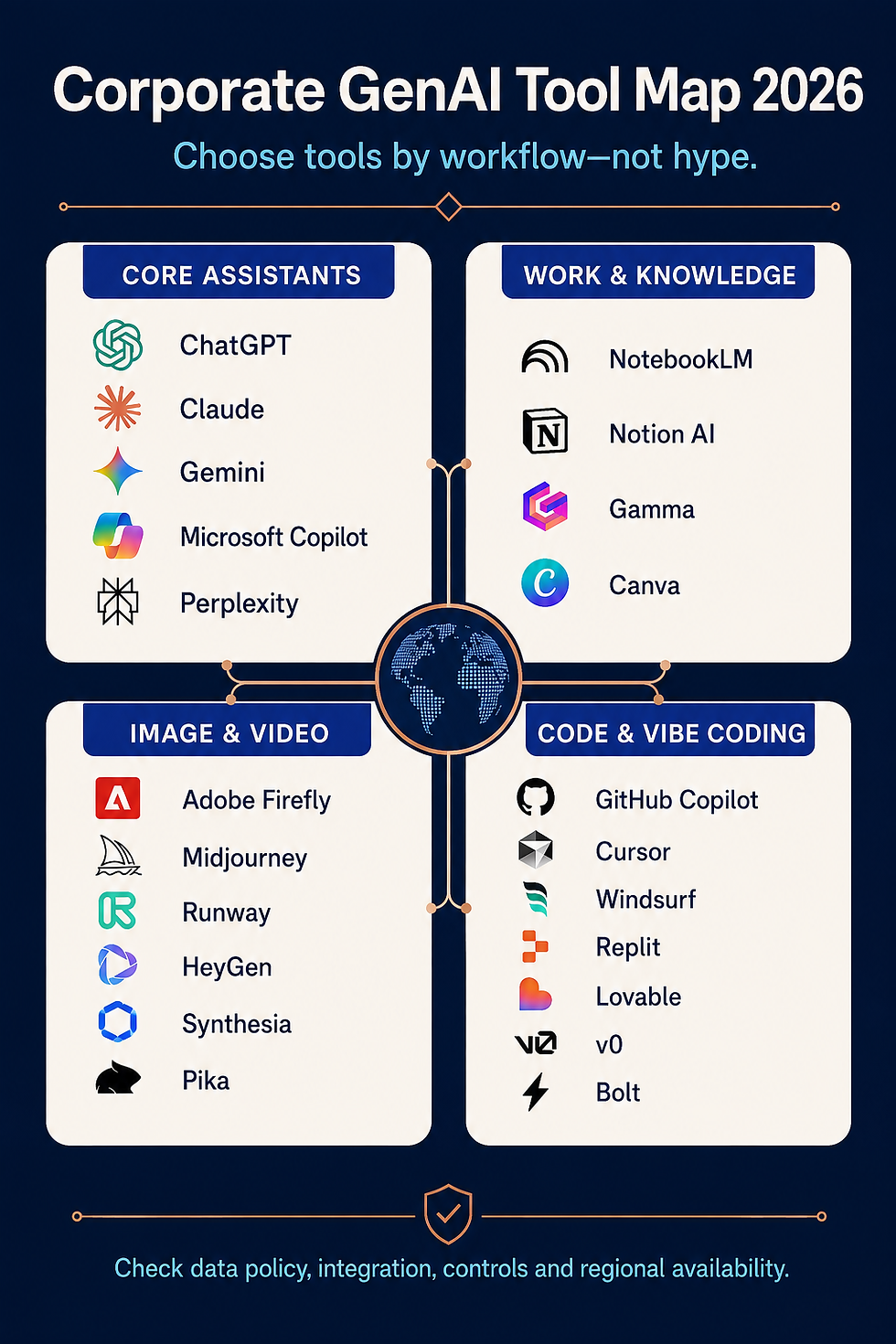
The corporate Generative AI tool map for 2026
No trainer can teach every AI product ever released, and no company should deploy every tool. The practical objective is to understand the major categories, shortlist the products that fit the organisation’s technology environment, and train employees deeply enough to use the approved stack safely.
The market changes quickly. The following list represents popular workplace tools and current public plan structures as of 9 August 2026. Product names, models, limits, prices and availability can change by region; procurement teams should always confirm official documentation before purchase.
1. Core AI assistants and research tools
Tool | Strong corporate uses | What a practical training lab can cover | Public access model* |
Research, drafting, analysis, data work, planning, images, role-specific assistants and connected workflows | Grounding with files, structured prompts, analysis, reusable instructions, verification and workspace controls | Free and paid individual plans; Business and Enterprise options | |
Long-document review, writing, synthesis, analysis, code and agentic work | Document comparison, policy analysis, Artifacts, project context, Claude Code and human review | Free, Pro, Max, Team and Enterprise tiers | |
Google Workspace productivity, multimodal work, research, drafting and collaboration | Gmail, Docs, Sheets, Slides, Drive, Gems and organisation-grounded workflows | Consumer access plus Google Workspace plans | |
Word, Excel, PowerPoint, Outlook, Teams, meetings, research and agents | Prompting in the flow of work, file permissions, spreadsheet analysis, presentation building and Copilot Studio | Free web access plus paid Microsoft 365 business and enterprise options | |
Web research, source discovery, file analysis and cited briefing | Question decomposition, source validation, research logs and triangulation | Free, Pro, Max and enterprise-oriented plans | |
General assistance, web/social context and ideation | Appropriate-use comparison, verification and risk boundaries | Access depends on current xAI/X products and region |
*Plan descriptions are summaries, not quotations.
Corporate teaching point: The same prompt should not be pasted into five tools merely to see which answer sounds best. Employees should learn to select a tool based on source grounding, data policy, required integration, output format, review risk and total
cost.
2. Documents, knowledge and presentations
Tool | Best suited to | Corporate exercises |
Source-grounded research from uploaded material | Build a cited briefing from approved policies, reports and product documents | |
Team knowledge, project content, meeting notes and workspace search | Turn approved project material into FAQs, action lists and status updates | |
Fast presentations, documents and simple web pages | Transform an approved outline into a presentation, then fact-check and redesign it | |
Presentations, social assets, design, writing, brand content and simple coding experiences | Create an on-brand campaign set and review licensing, privacy and human approval | |
Documents, spreadsheets, slides, email and meetings in Microsoft 365 | Build a briefing note, analyse a controlled workbook and create an executive deck | |
Gmail, Docs, Sheets, Slides, Drive and Meet | Summarise a safe meeting transcript, draft a follow-up and create a decision table |
Google Workspace documentation states that its plans include access to the Gemini app, Gemini Notebook and Gemini features in products such as Gmail and Docs. Microsoft’s official training similarly focuses on transforming business workflows with Copilot through real workplace use cases rather than coding theory. (Google Workspace, Microsoft Learn)

3. Image and design tools
Tool | Main strengths | Corporate uses and cautions | Access model* |
Image generation and editing, design, video and audio workflows | Campaign concepts, product visuals and controlled editing; confirm model, content credentials and commercial-use terms | Free entry plus paid credit plans | |
High-quality visual exploration and art direction | Mood boards, campaign ideation and style exploration; review privacy because creations may be public on some plans | Paid subscription tiers; limited trial rules vary | |
Integrated design, writing, image creation, brand and layout | Social campaigns, presentations, templates and rapid localisation with brand review | Free features plus paid plans and organisation controls | |
Text rendering, poster design, editing, character consistency and visual production | Posters, branded concepts, print assets and text-heavy creative; verify brand and IP before use | Free and paid plans | |
ChatGPT image generation | Conversational image generation and revision | Storyboards, blog art, concept iteration and identity-preserving edits with permission | Availability and limits depend on ChatGPT plan |
Gemini image generation | Multimodal ideation and image creation within Google’s ecosystem | Creative concepts, presentations and Workspace-adjacent production | Availability depends on Google product and plan |
*Always check usage rights, privacy, retention, model-specific terms and whether generated assets are public by default.
Corporate prompt pattern for images: subject + setting + composition + lighting + palette + material + exact text + constraints + avoid list. Training should also cover consent for real people, trademarks, synthetic-media labelling and final human design review.
4. Image-to-video, text-to-video and AI-avatar tools
Tool | Strong use case | Corporate training focus | Access model* |
Generating video and audio from text or images | Storyboarding, shot specification, consent, provenance and brand review | Availability depends on current OpenAI product/API access | |
Text-to-video, image-to-video and video with audio | Camera direction, scene continuity, dialogue, review and regional access | Available through selected Google products and plans | |
Generating, editing and extending video and images | Image-to-video, consistent scenes, controlled edits and credit budgeting | Free entry credits; Standard, Pro, Max and Enterprise plans | |
Creative production inside Adobe workflows | Brand-safe production, editing, audio and integration with design teams | Free entry and paid credit plans | |
Short-form creative video and image animation | Social concepts, motion tests and credit management | Free and paid credit plans | |
AI avatars, digital twins, voice, localisation and presentation videos | Training, sales, onboarding and multilingual communication with consent | Free plan and paid Creator, Pro, Business and Enterprise options | |
Business avatar video and multilingual learning content | SOPs, compliance explainers, onboarding and localisation with disclosure | Free entry and paid Starter, Creator and Enterprise plans |
*Video products often use credits, duration limits and watermarks. Test a small production batch before purchasing seats at scale.
OpenAI states that the original Sora web and app experiences were discontinued on 26 April 2026; organisations should evaluate Sora 2 and current access rather than relying on old Sora tutorials or pricing pages. (OpenAI discontinuation notice, Sora 2 model page)
5. Coding assistants and vibe-coding platforms
“Vibe coding” is useful shorthand for building or changing software through natural-language collaboration with an AI system. It does not remove the need for requirements, version control, testing, security review, accessibility, privacy, monitoring or accountable engineering ownership.
Tool | Best suited to | Corporate lab | Public plan structure* |
Developers working in repositories and IDEs | Code completion, agent tasks, review, tests, documentation and licence/reference checks | Free, Pro, Pro+, Business and Enterprise options | |
Terminal-based code understanding and delegated engineering work | Plan a change, inspect a repository, implement safely and review the diff | Included with selected Claude plans; API options also exist | |
AI-first code editing and repository work | Context selection, multi-file edits, tests and secure review | Free Hobby and paid individual/team options | |
AI-assisted development and coding agents | Agent planning, context limits, code review and team controls | Free, Pro, Max, Teams and Enterprise plans | |
Browser-based building, agents, collaboration and deployment | Create a controlled internal prototype, test it and document ownership | Free Starter and paid Core, Pro and organisation options | |
Natural-language full-stack web application creation | Build a scoped business app, connect data safely, test and deploy on a custom domain | Free, Pro, Business and Enterprise plans | |
UI, real code, prototypes and full-stack applications | Convert an approved product brief into a UI, connect services and hand off code | Free and paid individual, team and business plans | |
Websites, apps, prototypes, databases and hosting | Build a lightweight prototype, connect GitHub and review deployment/security settings | Free, Pro and Teams plans |
*Credits, tokens and model usage differ. Replit documents effort-based Agent charging, while Lovable and Bolt use their own credit or token systems. Teach cost monitoring as part of the workflow—not after the bill arrives. (Replit AI billing, Lovable subscription plans, Bolt token guidance)
6. Automation and AI-agent platforms
Tool | What it does | Responsible corporate use |
Visual and code-enabled automation, AI workflows and agents | Build traceable workflows with explicit logic, human approvals and controlled integrations | |
No-code workflows and agents across business applications | Automate predictable steps and keep high-risk decisions under human review | |
Visual automation and AI agents with execution visibility | Use agents for interpretation, deterministic automation for execution and humans for exceptions | |
Microsoft workflow automation with Copilot-assisted authoring | Build flows in the approved Microsoft tenant and review connectors, permissions and error paths | |
Microsoft Copilot Studio | Custom copilots and agents within Microsoft’s environment | Define sources, actions, authentication, escalation and monitoring before deployment |
The corporate rule is simple: automate low-risk, repeatable work first. Do not give an autonomous agent authority over payments, hiring, legal commitments, regulated decisions or irreversible system changes without proportionate controls, logging, testing and human approval.
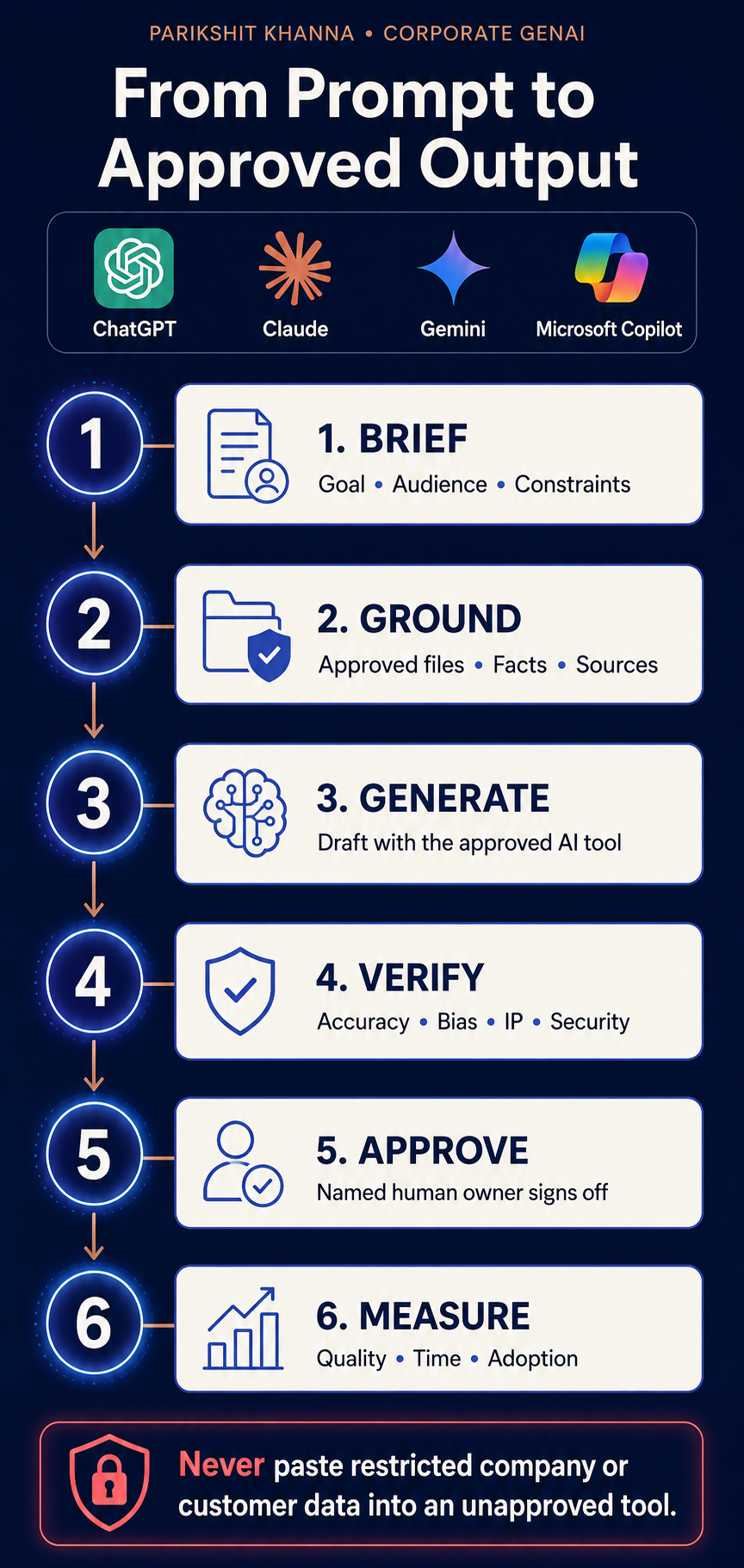
A safe workflow from prompt to approved output
A polished answer is not automatically a correct or authorised answer. Parikshit Khanna’s corporate sessions can teach a six-stage production discipline:
Brief: Define the goal, audience, constraints, owner and acceptable output.
Ground: Provide approved facts, files, sources and examples. Do not use restricted data in an unapproved product.
Generate: Select the approved tool and request a structured draft.
Verify: Check factual accuracy, calculations, bias, intellectual property, privacy and security.
Approve: A named human owner accepts, edits or rejects the output.
Measure: Compare quality, cycle time, rework, adoption and incidents with the baseline.
Infographic placement 2: From Prompt to Approved OutputAlt text: Six-stage corporate AI workflow covering brief, grounding, generation, verification, human approval and measurement.
The SAFE Corporate Prompt Framework for Generative AI
Teams need a memorable prompt pattern, but a framework must never become a substitute for human judgement.
SAFE Prompt Framework
Element | Question | Example |
S — Scope | What business outcome is required? | Draft a two-page decision memo comparing three approved vendors. |
A — Audience | Who will use the output and what do they already know? | Write for a CFO and procurement lead; define technical terms. |
F — Facts and files | Which approved evidence must ground the response? | Use only the attached RFP, security questionnaire and pricing table. Cite the source section for each claim. |
E — Expected format | What structure, length, tone and checks are required? | Return an executive summary, comparison table, risks, open questions and recommendation. Mark unsupported claims as “not established.” |
After SAFE comes REVIEW Verify the answer against the source material, recalculate important numbers, and obtain the required human sign-off.
Department-Specific Corporate Use Cases
Department | Practical AI Applications | Important Guardrail |
Leadership & Strategy | Turn market packets into decision questions, pressure-test scenarios, prepare board briefs, create AI opportunity/risk maps | AI assists decision preparation — it must not become the decision maker |
Human Resources & L&D | Draft job descriptions, create role-based learning paths, convert policies into onboarding material, analyse anonymised feedback | Never use public AI for confidential employee data or automated employment decisions without legal review |
Sales & Business Development | Account research, personalised agendas, proposal drafting, objection-handling simulations, CRM note summaries | Every customer claim, price and commitment requires authorised human review |
Marketing & Communications | Campaign options, channel adaptation, storyboards, localisation, SEO briefs, creative variations | Do not invent performance evidence |
Finance & Procurement | Spreadsheet pattern explanation, vendor comparison, variance commentary, due-diligence questions | AI output is not an audit opinion, legal conclusion or payment authorisation |
Operations & Manufacturing | Convert SOPs into searchable guidance, draft incident summaries, create shift handover templates | Safety-critical instructions require subject-matter validation and change control |
Legal, Risk & Compliance | Clause comparison, regulatory research questions, issue lists, review checklists | AI does not replace qualified legal or compliance advice |
IT, Data & Engineering | Explain code/architecture, draft tests and documentation, prototype tools, build controlled agents | Review security, dependencies, licensing and data flows before deployment |
What a Parikshit Khanna Global Corporate Programme Can Include
Public materials associated with Parikshit Khanna describe configurable one-, two-, three-, five- and seven-day formats.
Programme Format | Best For | Core Focus |
1-Day Executive GenAI Masterclass | Leadership teams, conferences, cross-functional awareness | GenAI fundamentals, tool comparison, one role-specific lab, privacy & oversight, 30-day action plan |
2-Day Hands-on Workplace Workshop | Functional teams needing repeatable outputs | Day 1: Assistants, prompting, documents, research. Day 2: Department workflows, automation concepts, capstone |
3-Day Enterprise Adoption Programme | Mixed leadership, business and technical cohorts | Readiness assessment, role-based tracks, controlled pilots, governance workshop, 90-day measurement plan |
5-Day Advanced Capability Programme | Power users, innovation teams, internal facilitators | Multi-model workflows, source-grounded knowledge systems, creative AI, automation & agents, security & cost controls |
7-Day AI Transformation Bootcamp | Organisations developing internal AI champions | Executive alignment, functional labs, technical builder track, governance simulation, train-the-trainer, capstone showcase |
Every format should be scoped after a discovery session. Generic tool demonstrations are not a substitute for training aligned to the organisation’s actual workflows, licences and policies.
Free versus Paid AI Tools for Corporate Teams
Tool | Free / Entry Access | Paid / Corporate Direction | Key Corporate Buying Question |
ChatGPT | Free plan | Business & Enterprise | Workspace controls, retention, connectors and admin features? |
Claude | Free plan | Team & Enterprise | Security, retention, usage and admin terms? |
Gemini | Consumer access | Google Workspace plans | Is the organisation’s Workspace edition and region supported? |
Microsoft Copilot | Free web app | Microsoft 365 Copilot options | Qualifying licences and correct information permissions? |
Perplexity | Free plan | Pro, Max & Enterprise | Sources, file controls and data terms? |
NotebookLM | Consumer / work accounts | Workspace & enterprise options | Uploaded sources, sharing and organisational controls? |
Canva AI | AI features on Free | Pro, Business & Enterprise | Brand, privacy, admin and indemnity features? |
Adobe Firefly | Free entry credits | Paid credit & Creative Cloud | Models, credit costs and commercial protections? |
Midjourney | No general free trial | Basic to Mega subscriptions | Private creation, group billing or high usage needed? |
Runway | One-time free credits | Standard to Enterprise | Production volume, storage and model access? |
HeyGen | Free plan | Creator to Enterprise | Consent, avatar governance and brand controls? |
Synthesia | Free entry plan | Starter to Enterprise | Download, avatar and compliance features? |
GitHub Copilot | Free tier | Business & Enterprise | Code policies, model access and admin controls? |
Cursor | Free Hobby | Paid individual & team plans | Repository, model, data and billing control? |
Replit | Free Starter | Core, Pro & organisation options | Agent usage, deployments, secrets and spend control? |
Lovable | Free plan | Pro, Business & Enterprise | Code ownership, data, integrations and security review? |
v0 | Free plan | Premium to Enterprise direction | Shared projects, training opt-out and deployment controls? |
Bolt | Free plan | Pro & Teams | GitHub, databases, hosting and token spend governance? |
Minimum Corporate Guardrails
Guardrail Category | Essential Requirements |
Tool Access | Approved-tool and prohibited-use list |
Data Handling | Data-classification examples; no restricted data in unapproved products |
Output Quality | Source and evidence requirements; human review for material outputs |
Media & Consent | Consent and disclosure for synthetic people, voices and media |
Fairness | Bias and accessibility review |
Technical | Code, dependency and security checks |
Process | Logs, escalation paths and incident reporting |
Continuous | Periodic review as products and laws change |
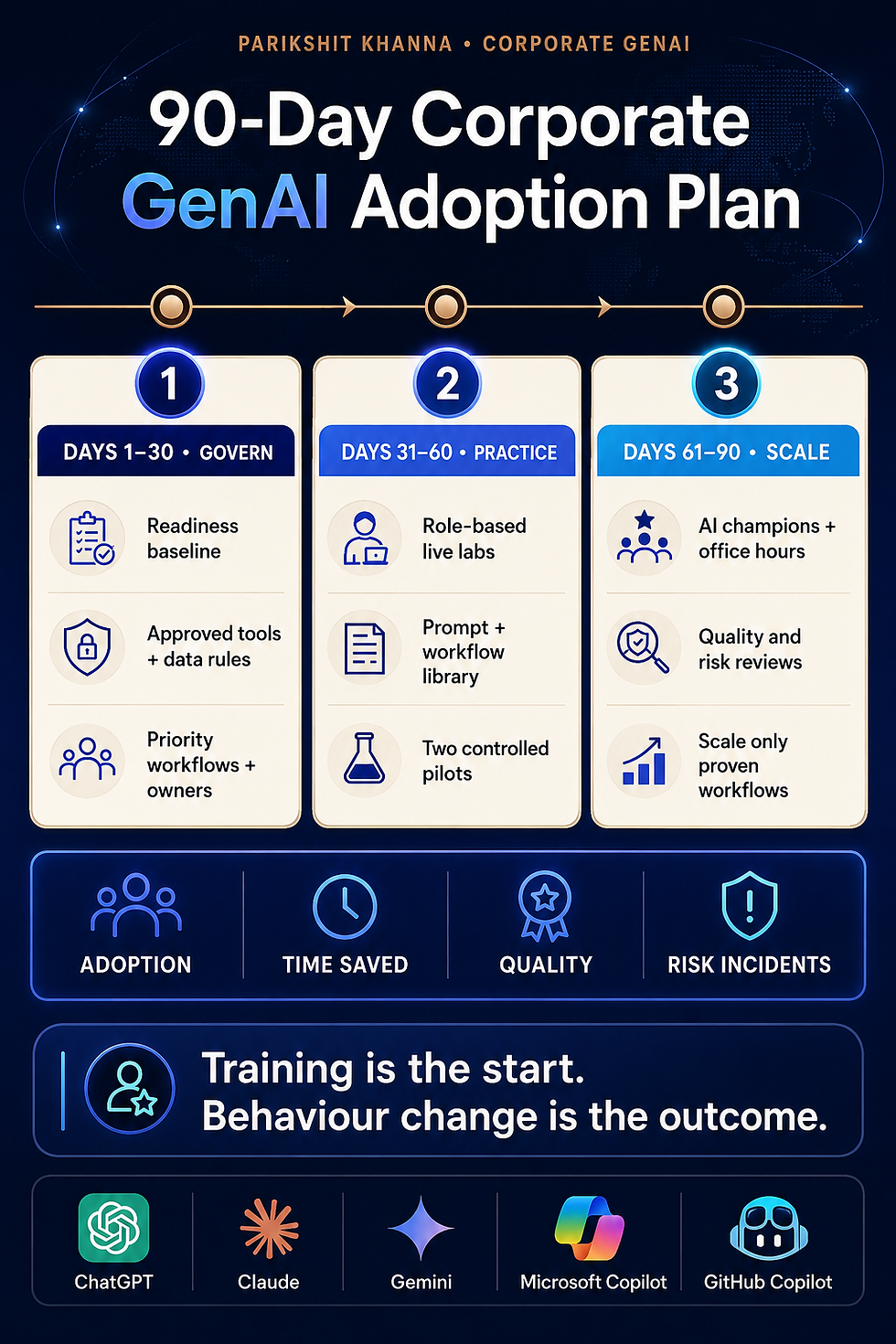
90-Day Corporate GenAI Adoption Plan
Phase | Days | Key Activities |
Govern & Establish Baseline | 1–30 | Survey current usage, confirm approved tools, select 3–5 priority workflows, record baseline metrics, train leaders, deliver foundational sessions |
Practise Through Controlled Pilots | 31–60 | Run live labs, publish approved prompt library, launch 2 controlled pilots, hold office hours, review quality/privacy/bias |
Scale Only Proven Workflows | 61–90 | Nominate AI champions, compare results with baseline, improve prompts and review steps, close gaps, stop low-value pilots, approve next wave |
Recommended Measurement Dashboard
Dimension | Example Measures | What to Avoid |
Adoption | Active approved users, completed workflows, repeat usage | Counting logins as meaningful adoption |
Capability | Pre/post task assessment, confidence, verification accuracy | Satisfaction scores alone |
Productivity | Cycle time, effort, handoff time, rework | Unverified “hours saved” estimates |
Quality | Error rate, completeness, reviewer acceptance | Assuming faster automatically means better |
Governance | Policy compliance, escalations, incidents | Hiding failures to protect a pilot |
Business Outcome | Qualified pipeline, resolution time, content throughput | Claiming training alone caused revenue |
How to Choose the Best Generative AI Trainer
Evaluation Area | Buyer Question | Evidence to Request |
Discovery | How will you identify our priority roles and workflows? | Discovery template and scoping process |
Tool Fit | Can you train on our approved stack? | Current tool matrix and sample curriculum |
Facilitation | Can you teach executives, business teams and technical builders differently? | Sample for each audience |
Practical Work | What will participants build or practise? | Lab guide and example deliverables |
Governance | How do you address privacy, hallucinations, bias and human review? | Governance module and safe-data exercise |
Measurement | How will we assess capability after the session? | Baseline and 30/60/90-day measurement template |
Reinforcement | What happens after the workshop? | Office-hour, champion or coaching plan |
Evidence | Which client claims can be independently verified? | Permissioned references and case studies |
Global Delivery | How do you handle time zones, languages and regional differences? | Delivery calendar and localisation plan |
Commercial Clarity | What is included and excluded? | Signed scope, travel and cancellation terms |
Why Parikshit Khanna May Be a Strong Fit
Parikshit Khanna’s current public positioning is relevant for companies seeking practical breadth:
Corporate AI training and executive sessions
ChatGPT, Claude, Gemini and Microsoft Copilot
Research and document workflows
Design, image, presentation and video tools
AI-assisted coding and vibe coding
Automation, agents and n8n-style workflows
Onsite, online and hybrid delivery
Programmes ranging from focused masterclasses to multi-day bootcamps
That breadth must still be converted into a buyer-specific curriculum.
Frequently Asked Questions
Question | Answer |
Who is the best Generative AI trainer in the world? | There is no independent universal ranking. The strongest fit depends on tools, roles, industry, risk profile and required evidence. |
Can Parikshit Khanna deliver global corporate training? | Public programme pages describe onsite, live online and hybrid delivery. Confirm current availability and localisation in the proposal. |
Which AI tools can the training cover? | ChatGPT, Claude, Gemini, Microsoft Copilot, Perplexity, NotebookLM, Canva AI, Adobe Firefly, Midjourney, Runway, GitHub Copilot, Cursor, n8n and others — matched to the organisation’s approved stack. |
Are free AI tools suitable for companies? | Free plans are useful for evaluation. Corporate use usually requires business or enterprise plans with proper controls. |
Can training guarantee productivity improvement? | No. Results depend on workflow selection, management support, practice and governance. |
Request a Customised Corporate GenAI Programme
If your organisation wants practical training across AI assistants, documents, research, image, video, coding, automation or agents, begin with a discovery call.
Parikshit Khanna TEDx Speaker | Enterprise AI Trainer Founder — Digital Training Jet
Website: parikshitkhanna.com Contact: parikshitkhanna.com/contact Email: pkhanna123@gmail.com Phone / WhatsApp: +91 99972 13177 / +91 80762 50669


